
Tools & Agents
Meloqui supports Tool Calling (also known as Function Calling), allowing LLMs to interact with external data and systems. This transforms the LLM from a text generator into an intelligent agent.
The Agent Loop
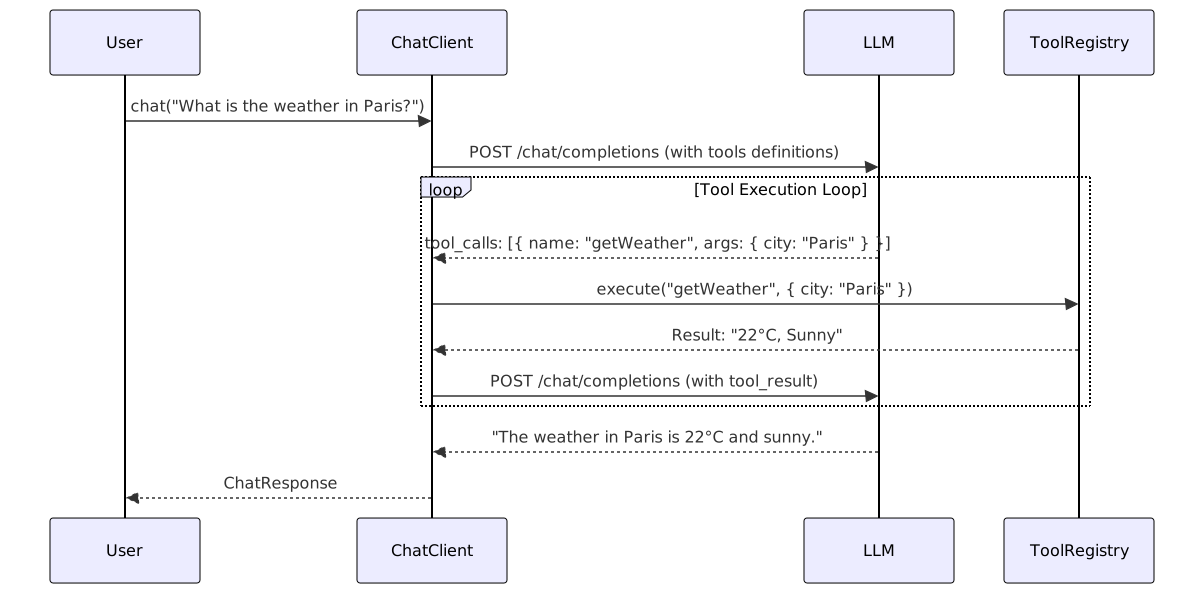
When you register tools, Meloqui automatically handles the "Agent Loop"—the back-and-forth process of executing tools requested by the model.
Registering Tools
typescript
import { ToolRegistry } from 'meloqui';

const registry = new ToolRegistry();

registry.registerTool(
  'get_weather',
  async ({ location }) => {
    return { temp: 72, condition: 'Sunny' };
  },
  { description: 'Get the weather for a location' }
);

const client = new ChatClient({
  provider: 'openai',
  model: 'gpt-4o',
  tools: registry
});
Automatic Execution
When you send a message that requires a tool, ChatClient automatically:
- Detects the tool call request from the LLM.
- Executes the matching function in your registry.
- Sends the result back to the LLM.
- Returns the final natural language response to you.
typescript
// The model will call get_weather("London") behind the scenes
const response = await client.chat('What is the weather in London?');
console.log(response.content);
// "It is currently 72°F and Sunny in London."